
Prediksi Kriteria Hujan Menggunakan Jaringan Syaraf Tiruan Backpropagation
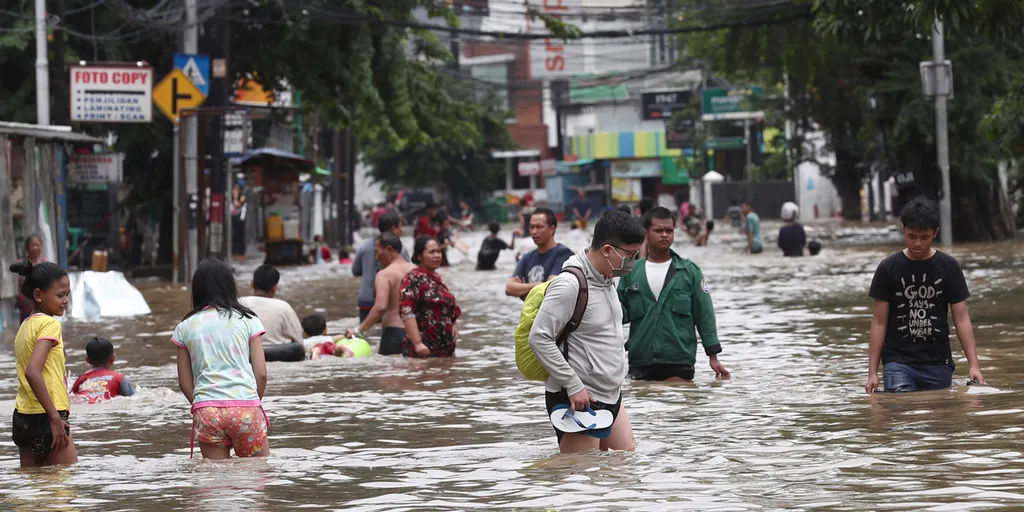
Prediksi cuaca, khususnya prediksi hujan, merupakan salah satu tantangan penting dalam meteorologi. Pemanfaatan data historis cuaca dan teknik kecerdasan buatan seperti jaringan syaraf tiruan (JST) dapat membantu meningkatkan akurasi prediksi. Dalam artikel ini, kita akan membahas cara menggunakan MATLAB untuk memprediksi kriteria hujan (tidak hujan, hujan ringan, dan hujan sedang) berdasarkan berbagai variabel cuaca menggunakan metode JST Backpropagation.
Data yang Digunakan
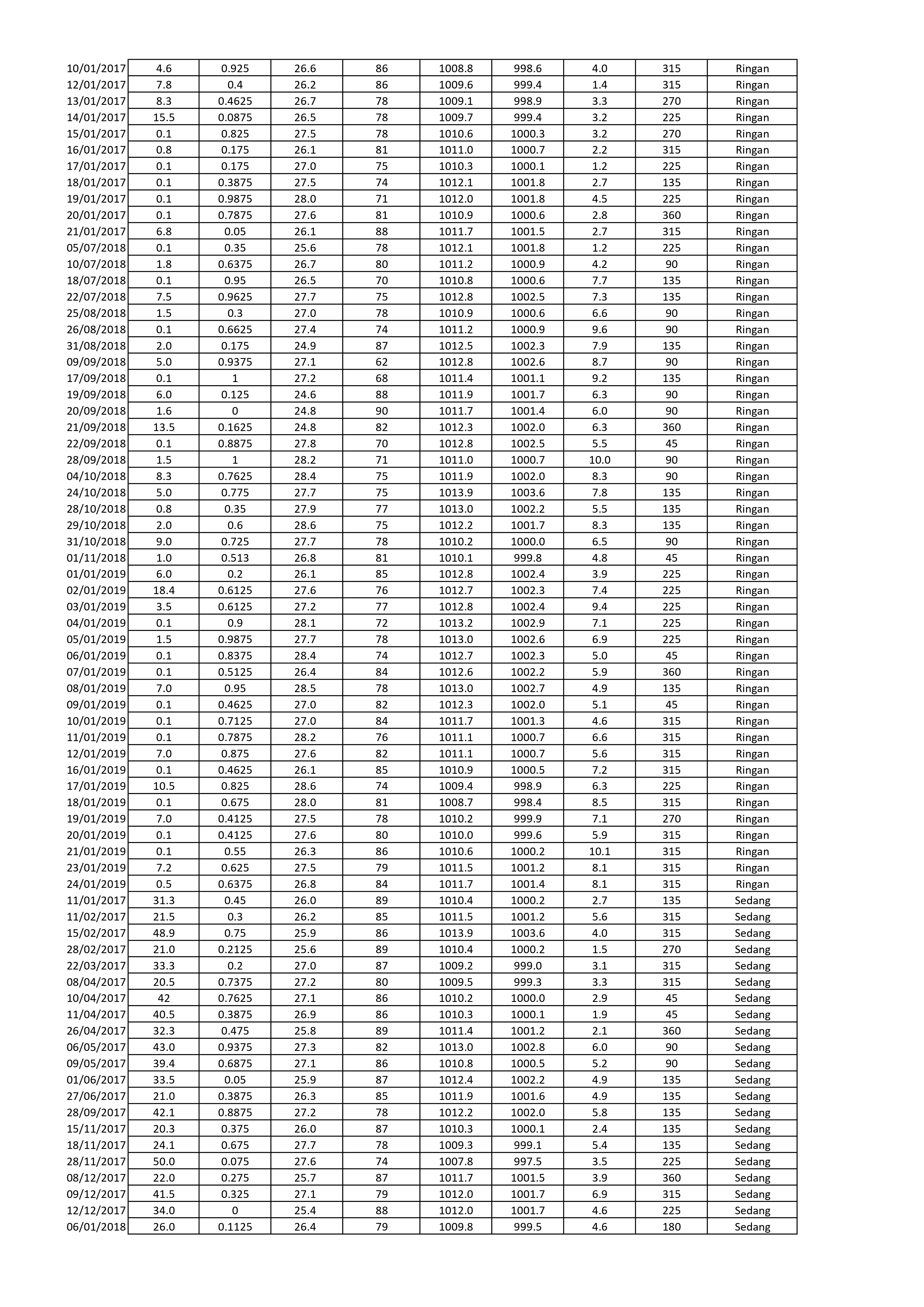
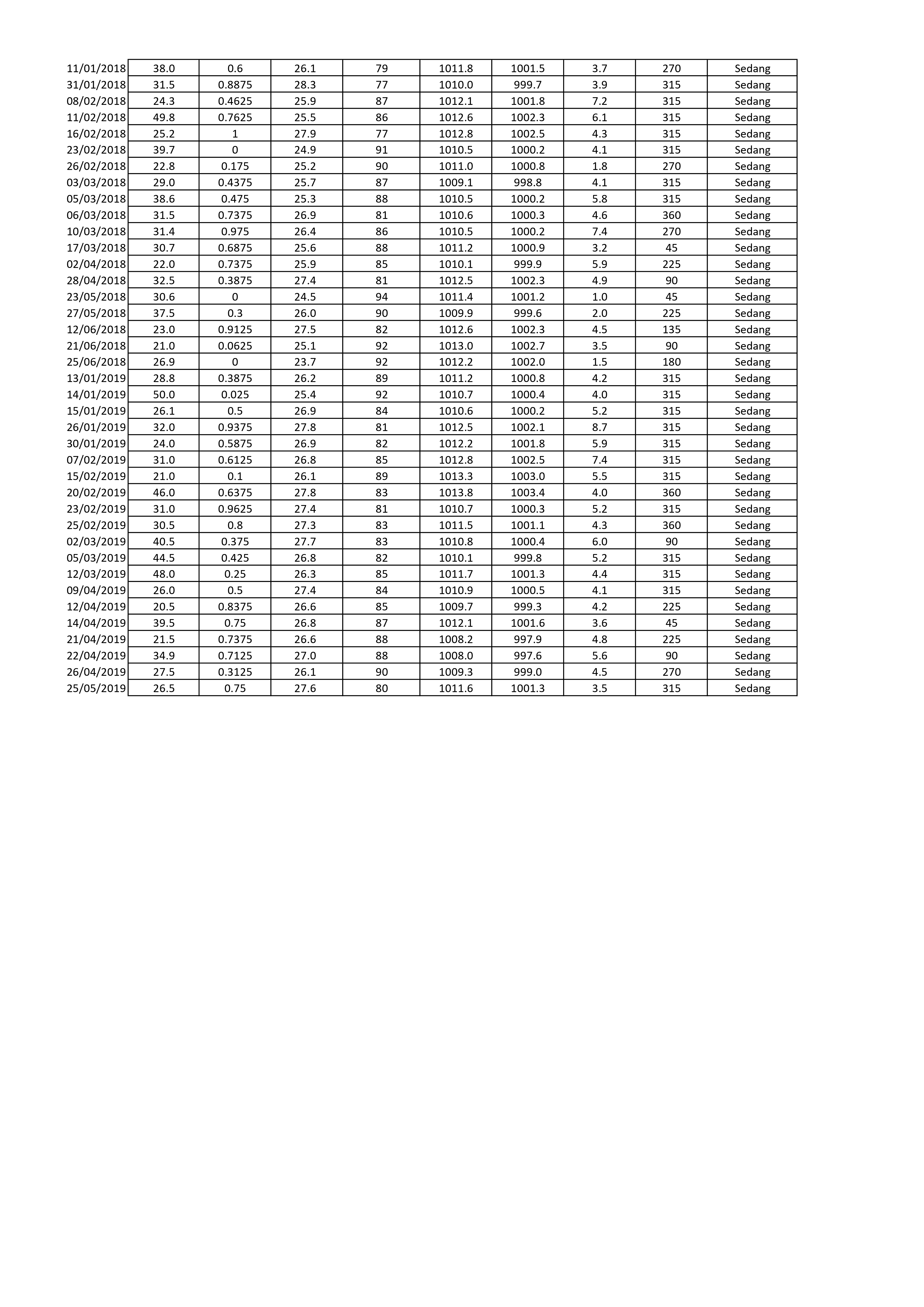
Untuk membuat model prediksi ini, kita akan menggunakan data cuaca dari tahun 2017 hingga 2019. Data terdiri dari:
- Data Hujan
- Data Penyinaran Matahari
- Data Suhu
- Data Kelembaban
- Data Tekanan QFF
- Data Tekanan QFE
- Data Kecepatan Angin
- Data Arah Angin
Persiapan Data
- Import data cuaca ke dalam workspace MATLAB.
- Normalisasi data agar setiap variabel memiliki rentang nilai yang seragam.
- Pembagian data menjadi data latih dan data uji.
Jumlah data latih yang digunakan adalah 180 data dari tahun 2017-2019, sedangkan data uji berjumlah 40 data dari tahun 2019.


Pelatihan Jaringan Syaraf Tiruan
- Membuat JST dengan struktur yang sesuai (misalnya, 10 neuron pada hidden layer).
- Menggunakan algoritma backpropagation untuk melatih jaringan.
- Menentukan fungsi aktivasi dan parameter lainnya seperti learning rate.

Source code untuk halaman pelatihan:
function varargout = halaman_pelatihan(varargin)
% HALAMAN_PELATIHAN MATLAB code for halaman_pelatihan.fig
%      HALAMAN_PELATIHAN, by itself, creates a new HALAMAN_PELATIHAN or raises the existing
%      singleton*.
%
%      H = HALAMAN_PELATIHAN returns the handle to a new HALAMAN_PELATIHAN or the handle to
%      the existing singleton*.
%
%      HALAMAN_PELATIHAN('CALLBACK',hObject,eventData,handles,...) calls the local
%      function named CALLBACK in HALAMAN_PELATIHAN.M with the given input arguments.
%
%      HALAMAN_PELATIHAN('Property','Value',...) creates a new HALAMAN_PELATIHAN or raises the
%      existing singleton*.  Starting from the left, property value pairs are
%      applied to the GUI before halaman_pelatihan_OpeningFcn gets called.  An
%      unrecognized property name or invalid value makes property application
%      stop.  All inputs are passed to halaman_pelatihan_OpeningFcn via varargin.
%
%      *See GUI Options on GUIDE's Tools menu.  Choose "GUI allows only one
%      instance to run (singleton)".
%
% See also: GUIDE, GUIDATA, GUIHANDLES

% Edit the above text to modify the response to help halaman_pelatihan

% Last Modified by GUIDE v2.5 12-Feb-2021 02:07:19

% Begin initialization code - DO NOT EDIT
gui_Singleton = 1;
gui_State = struct('gui_Name',       mfilename, ...
    'gui_Singleton',  gui_Singleton, ...
    'gui_OpeningFcn', @halaman_pelatihan_OpeningFcn, ...
    'gui_OutputFcn',  @halaman_pelatihan_OutputFcn, ...
    'gui_LayoutFcn',  [] , ...
    'gui_Callback',   []);
if nargin && ischar(varargin{1})
    gui_State.gui_Callback = str2func(varargin{1});
end

if nargout
    [varargout{1:nargout}] = gui_mainfcn(gui_State, varargin{:});
else
    gui_mainfcn(gui_State, varargin{:});
end
% End initialization code - DO NOT EDIT


% --- Executes just before halaman_pelatihan is made visible.
function halaman_pelatihan_OpeningFcn(hObject, eventdata, handles, varargin)
% This function has no output args, see OutputFcn.
% hObject    handle to figure
% eventdata  reserved - to be defined in a future version of MATLAB
% handles    structure with handles and user data (see GUIDATA)
% varargin   command line arguments to halaman_pelatihan (see VARARGIN)

% Choose default command line output for halaman_pelatihan
handles.output = hObject;

% Update handles structure
guidata(hObject, handles);
movegui(hObject,'center');

% UIWAIT makes halaman_pelatihan wait for user response (see UIRESUME)
% uiwait(handles.figure1);


% --- Outputs from this function are returned to the command line.
function varargout = halaman_pelatihan_OutputFcn(hObject, eventdata, handles)
% varargout  cell array for returning output args (see VARARGOUT);
% hObject    handle to figure
% eventdata  reserved - to be defined in a future version of MATLAB
% handles    structure with handles and user data (see GUIDATA)

% Get default command line output from handles structure
varargout{1} = handles.output;


function edit3_Callback(hObject, eventdata, handles)
% hObject    handle to edit3 (see GCBO)
% eventdata  reserved - to be defined in a future version of MATLAB
% handles    structure with handles and user data (see GUIDATA)

% Hints: get(hObject,'String') returns contents of edit3 as text
%        str2double(get(hObject,'String')) returns contents of edit3 as a double


% --- Executes during object creation, after setting all properties.
function edit3_CreateFcn(hObject, eventdata, handles)
% hObject    handle to edit3 (see GCBO)
% eventdata  reserved - to be defined in a future version of MATLAB
% handles    empty - handles not created until after all CreateFcns called

% Hint: edit controls usually have a white background on Windows.
%       See ISPC and COMPUTER.
if ispc && isequal(get(hObject,'BackgroundColor'), get(0,'defaultUicontrolBackgroundColor'))
    set(hObject,'BackgroundColor','white');
end


% --- Executes on selection change in popupmenu3.
function popupmenu3_Callback(hObject, eventdata, handles)
% hObject    handle to popupmenu3 (see GCBO)
% eventdata  reserved - to be defined in a future version of MATLAB
% handles    structure with handles and user data (see GUIDATA)

% Hints: contents = cellstr(get(hObject,'String')) returns popupmenu3 contents as cell array
%        contents{get(hObject,'Value')} returns selected item from popupmenu3


% --- Executes during object creation, after setting all properties.
function popupmenu3_CreateFcn(hObject, eventdata, handles)
% hObject    handle to popupmenu3 (see GCBO)
% eventdata  reserved - to be defined in a future version of MATLAB
% handles    empty - handles not created until after all CreateFcns called

% Hint: popupmenu controls usually have a white background on Windows.
%       See ISPC and COMPUTER.
if ispc && isequal(get(hObject,'BackgroundColor'), get(0,'defaultUicontrolBackgroundColor'))
    set(hObject,'BackgroundColor','white');
end


function edit4_Callback(hObject, eventdata, handles)
% hObject    handle to edit4 (see GCBO)
% eventdata  reserved - to be defined in a future version of MATLAB
% handles    structure with handles and user data (see GUIDATA)

% Hints: get(hObject,'String') returns contents of edit4 as text
%        str2double(get(hObject,'String')) returns contents of edit4 as a double


% --- Executes during object creation, after setting all properties.
function edit4_CreateFcn(hObject, eventdata, handles)
% hObject    handle to edit4 (see GCBO)
% eventdata  reserved - to be defined in a future version of MATLAB
% handles    empty - handles not created until after all CreateFcns called

% Hint: edit controls usually have a white background on Windows.
%       See ISPC and COMPUTER.
if ispc && isequal(get(hObject,'BackgroundColor'), get(0,'defaultUicontrolBackgroundColor'))
    set(hObject,'BackgroundColor','white');
end


% --- Executes on selection change in popupmenu1.
function popupmenu1_Callback(hObject, eventdata, handles)
% hObject    handle to popupmenu1 (see GCBO)
% eventdata  reserved - to be defined in a future version of MATLAB
% handles    structure with handles and user data (see GUIDATA)

% Hints: contents = cellstr(get(hObject,'String')) returns popupmenu1 contents as cell array
%        contents{get(hObject,'Value')} returns selected item from popupmenu1


% --- Executes during object creation, after setting all properties.
function popupmenu1_CreateFcn(hObject, eventdata, handles)
% hObject    handle to popupmenu1 (see GCBO)
% eventdata  reserved - to be defined in a future version of MATLAB
% handles    empty - handles not created until after all CreateFcns called

% Hint: popupmenu controls usually have a white background on Windows.
%       See ISPC and COMPUTER.
if ispc && isequal(get(hObject,'BackgroundColor'), get(0,'defaultUicontrolBackgroundColor'))
    set(hObject,'BackgroundColor','white');
end


function edit1_Callback(hObject, eventdata, handles)
% hObject    handle to edit1 (see GCBO)
% eventdata  reserved - to be defined in a future version of MATLAB
% handles    structure with handles and user data (see GUIDATA)

% Hints: get(hObject,'String') returns contents of edit1 as text
%        str2double(get(hObject,'String')) returns contents of edit1 as a double


% --- Executes during object creation, after setting all properties.
function edit1_CreateFcn(hObject, eventdata, handles)
% hObject    handle to edit1 (see GCBO)
% eventdata  reserved - to be defined in a future version of MATLAB
% handles    empty - handles not created until after all CreateFcns called

% Hint: edit controls usually have a white background on Windows.
%       See ISPC and COMPUTER.
if ispc && isequal(get(hObject,'BackgroundColor'), get(0,'defaultUicontrolBackgroundColor'))
    set(hObject,'BackgroundColor','white');
end


% --- Executes on selection change in popupmenu2.
function popupmenu2_Callback(hObject, eventdata, handles)
% hObject    handle to popupmenu2 (see GCBO)
% eventdata  reserved - to be defined in a future version of MATLAB
% handles    structure with handles and user data (see GUIDATA)

% Hints: contents = cellstr(get(hObject,'String')) returns popupmenu2 contents as cell array
%        contents{get(hObject,'Value')} returns selected item from popupmenu2


% --- Executes during object creation, after setting all properties.
function popupmenu2_CreateFcn(hObject, eventdata, handles)
% hObject    handle to popupmenu2 (see GCBO)
% eventdata  reserved - to be defined in a future version of MATLAB
% handles    empty - handles not created until after all CreateFcns called

% Hint: popupmenu controls usually have a white background on Windows.
%       See ISPC and COMPUTER.
if ispc && isequal(get(hObject,'BackgroundColor'), get(0,'defaultUicontrolBackgroundColor'))
    set(hObject,'BackgroundColor','white');
end


function edit2_Callback(hObject, eventdata, handles)
% hObject    handle to edit2 (see GCBO)
% eventdata  reserved - to be defined in a future version of MATLAB
% handles    structure with handles and user data (see GUIDATA)

% Hints: get(hObject,'String') returns contents of edit2 as text
%        str2double(get(hObject,'String')) returns contents of edit2 as a double


% --- Executes during object creation, after setting all properties.
function edit2_CreateFcn(hObject, eventdata, handles)
% hObject    handle to edit2 (see GCBO)
% eventdata  reserved - to be defined in a future version of MATLAB
% handles    empty - handles not created until after all CreateFcns called

% Hint: edit controls usually have a white background on Windows.
%       See ISPC and COMPUTER.
if ispc && isequal(get(hObject,'BackgroundColor'), get(0,'defaultUicontrolBackgroundColor'))
    set(hObject,'BackgroundColor','white');
end


% --- Executes on button press in pushbutton1.
function pushbutton1_Callback(hObject, eventdata, handles)
% hObject    handle to pushbutton1 (see GCBO)
% eventdata  reserved - to be defined in a future version of MATLAB
% handles    structure with handles and user data (see GUIDATA)

% menampilkan menu browse file
[nama_file,nama_path] = uigetfile({'*.xlsx','Excel Data (*.xlsx)';
    '*.*','All file type (*.*)'},'Browse File');

% jika ada file yg dipilih maka akan menjalankan perintah di bawahnya
if ~isequal(nama_file,0)
    % membaca data pada file excel
    [~, ~, all_data] = xlsread(fullfile(nama_path,nama_file),1,'B2:J181');
    % menampilkan data pada tabel
    data_tabel = cell(180,9);
    for i = 1:size(data_tabel,1)
        for j = 1:size(data_tabel,2)-1
            data_tabel{i,j} = num2str(all_data{i,j});
        end
        data_tabel{i,9} = all_data{i,9};
    end

    % menampilkan data pada tabel
    set(handles.uitable1,'Data',data_tabel,'RowName',1:size(data_tabel,1))

    % menyimpan variabel all_data dan data_tabel pada lokasi handles
    % (lokasi penyimpanan variabel) agar dapat dipanggil oleh pushbutton
    % yg lain
    handles.all_data = all_data;
    handles.data_tabel = data_tabel;
    guidata(hObject,handles);
    % mereset button2
    if get(handles.radiobutton2,'Value')
        set(handles.pushbutton2,'Enable','on')
        set(handles.pushbutton3,'Enable','off')
        set(handles.pushbutton4,'Enable','off')
        set(handles.pushbutton5,'Enable','off')
        set(handles.pushbutton6,'Enable','off')
        set(handles.edit5,'String','')
        set(handles.edit6,'String','')
    else
        set(handles.pushbutton2,'Enable','off')
        set(handles.pushbutton3,'Enable','on')
        set(handles.pushbutton4,'Enable','off')
        set(handles.pushbutton5,'Enable','off')
        set(handles.pushbutton6,'Enable','off')
        set(handles.edit5,'String','')
        set(handles.edit6,'String','')
    end
else
    % jika tidak ada file yg dipilih maka akan kembali
    return
end


% --- Executes on button press in pushbutton2.
function pushbutton2_Callback(hObject, eventdata, handles)
% hObject    handle to pushbutton2 (see GCBO)
% eventdata  reserved - to be defined in a future version of MATLAB
% handles    structure with handles and user data (see GUIDATA)

% menampilkan menu browse file
[nama_file,nama_path] = uigetfile({'*.mat'});
% jika ada file yg dipilih maka akan menjalankan perintah di bawahnya
if ~isequal(nama_file,0)
    % load file bobot awal
    load(fullfile(nama_path,nama_file))
else
    % jika tidak ada file yg dipilih maka akan kembali
    return
end

% menyimpan variabel2 bobot dan bias pada lokasi handles agar dapat
% dipanggil oleh pushbutton yg lain
handles.bobot_hidden = bobot_hidden;
handles.bobot_keluaran = bobot_keluaran;
handles.bias_hidden = bias_hidden;
handles.bias_keluaran = bias_keluaran;
guidata(hObject, handles)

% mereset button2
set(handles.pushbutton3,'Enable','on')
set(handles.pushbutton4,'Enable','off')
set(handles.pushbutton5,'Enable','off')
set(handles.pushbutton6,'Enable','off')
set(handles.edit5,'String','')
set(handles.edit6,'String','')


% --- Executes on button press in pushbutton3.
function pushbutton3_Callback(hObject, eventdata, handles)
% hObject    handle to pushbutton3 (see GCBO)
% eventdata  reserved - to be defined in a future version of MATLAB
% handles    structure with handles and user data (see GUIDATA)

% mereset button2
warning off all
set(handles.pushbutton4,'Enable','on')
set(handles.pushbutton5,'Enable','off')
set(handles.pushbutton6,'Enable','off')
set(handles.edit5,'String','')
set(handles.edit6,'String','')

% memanggil variabel nama_path dan nama_file yg ada di lokasi handles
data_tabel = handles.data_tabel;

try
    % menyusun data latih asli
    data_latih_asli = zeros(180,8);
    for i = 1:size(data_latih_asli,1)
        for j = 1:size(data_latih_asli,2)
            data_latih_asli(i,j) = str2double(data_tabel{i,j});
        end
    end

    % mencari nilai min dan max pada data latih asli
    min_data = min(data_latih_asli);
    max_data = max(data_latih_asli);

    % proses normalisasi data
    [m,n] = size(data_latih_asli);
    data_norm = zeros(m,n);
    for x = 1:m
        for y = 1:n
            data_norm(x,y) = 0.1+0.8*(data_latih_asli(x,y)-min_data(y))/(max_data(y)-min_data(y));
        end
    end

    % menyiapkan data latih normalisasi
    data_latih_norm = data_norm(1:180,:);

    % menyiapkan target latih asli
    target_latih_asli = zeros(size(data_tabel,1),1);
    for k = 1:size(data_tabel,1)
        switch data_tabel{k,9}
            case 'Tdk Hujan'
                target_latih_asli(k,1) = 0;
            case 'Ringan'
                target_latih_asli(k,1) = 1;
            case 'Sedang'
                target_latih_asli(k,1) = 2;
            otherwise
                target_latih_asli(k,1) = 3;
        end
    end

    % memanggil parameter2 jst
    jumlah_neuron1 = str2double(get(handles.edit1,'String'));

    val1 = get(handles.popupmenu1,'Value');
    switch val1
        case 1
            fungsi_aktivasi1 = 'logsig';
        case 2
            fungsi_aktivasi1 = 'tansig';
    end

    val2 = get(handles.popupmenu2,'Value');
    switch val2
        case 1
            fungsi_aktivasi2 = 'purelin';
        case 2
            fungsi_aktivasi2 = 'logsig';
        case 3
            fungsi_aktivasi2 = 'tansig';
    end

    val4 = get(handles.popupmenu4,'Value');
    switch val4
        case 1
            fungsi_pelatihan = 'traingd';
        case 2
            fungsi_pelatihan = 'traingdx';
        case 3
            fungsi_pelatihan = 'trainlm';
        case 4
            fungsi_pelatihan = 'trainscg';
    end

    % membangun arsitektur jaringan syaraf tiruan
    rng('default')
    net = newff(minmax(data_latih_norm),[jumlah_neuron1 1],{fungsi_aktivasi1,...
        fungsi_aktivasi2},fungsi_pelatihan);
    % menginisialisasi bobot awal
    if get(handles.radiobutton1,'Value')
        % bobot random
        bobot_hidden = net.IW{1,1};
        bobot_keluaran = net.LW{2,1};
        bias_hidden = net.b{1,1};
        bias_keluaran = net.b{2,1};
        handles.bobot_hidden = bobot_hidden;
        handles.bobot_keluaran = bobot_keluaran;
        handles.bias_hidden = bias_hidden;
        handles.bias_keluaran = bias_keluaran;
        guidata(hObject, handles)
    else
        % load bobot
        net.IW{1,1} = handles.bobot_hidden;
        net.LW{2,1} = handles.bobot_keluaran;
        net.b{1,1} = handles.bias_hidden;
        net.b{2,1} = handles.bias_keluaran;
    end

    % memberikan nilai untuk mempengaruhi proses pelatihan
    val3 = get(handles.popupmenu3,'Value');
    switch val3
        case 1
            error_goal = 1e-6;
        case 2
            error_goal = 1e-5;
        case 3
            error_goal = 1e-4;
        case 4
            error_goal = 1e-3;
    end

    jumlah_epoch = str2double(get(handles.edit3,'String'));
    laju_pembelajaran = str2double(get(handles.edit4,'String'));

    % setting nilai untuk mempengaruhi proses pelatihan
    net.trainParam.goal = error_goal;
    net.trainParam.epochs = jumlah_epoch;
    net.trainParam.lr = laju_pembelajaran;

    % proses pelatihan
    net_keluaran = train(net,data_latih_norm,target_latih_asli');

    % hasil latih
    hasil_latih_asli = sim(net_keluaran,data_latih_norm);

    % menyusun kelas keluaran
    kelas_keluaran = cell(size(data_tabel,1),1);
    for k = 1:size(data_tabel,1)
        switch hasil_latih_asli(k,1)
            case 0
                kelas_keluaran{k,1} = 'Tdk Hujan';
            case 1
                kelas_keluaran{k,1} = 'Ringan';
            case 2
                kelas_keluaran{k,1} = 'Sedang';
            otherwise
                kelas_keluaran{k,1} = 'Anomali';
        end
    end

    % menghitung nilai akurasi
    jumlah_data_sesuai = 0;
    jumlah_data_tidak_sesuai = 0;
    jumlah_data_total = size(data_tabel,1);
    for k = 1:size(data_tabel,1)
        if isequal(data_tabel{k,9},kelas_keluaran{k,1})
            jumlah_data_sesuai = jumlah_data_sesuai+1;
        else
            jumlah_data_tidak_sesuai = jumlah_data_tidak_sesuai+1;
        end
    end
    akurasi = jumlah_data_sesuai/jumlah_data_total*100;

    % menyimpan variabel2 pada lokasi handles agar dapat dipanggil oleh
    % pushbutton yg lain
    handles.jumlah_data_sesuai = jumlah_data_sesuai;
    handles.jumlah_data_tidak_sesuai = jumlah_data_tidak_sesuai;
    handles.jumlah_data_total = jumlah_data_total;
    handles.akurasi = akurasi;
    handles.kelas_keluaran = kelas_keluaran;
    handles.net_keluaran = net_keluaran;
    handles.min_data = min_data;
    handles.max_data = max_data;
    guidata(hObject, handles);
catch
    % jika terjadi error maka akan menampilkan dialog
    warndlg('Pastikan bahwa arsitektur dari bobot yang di load sama dengan arsitektur jaringan yang dibangun')
    return
end


% --- Executes on button press in pushbutton4.
function pushbutton4_Callback(hObject, eventdata, handles)
% hObject    handle to pushbutton4 (see GCBO)
% eventdata  reserved - to be defined in a future version of MATLAB
% handles    structure with handles and user data (see GUIDATA)

% mereset button2
set(handles.pushbutton5,'Enable','on')
set(handles.pushbutton6,'Enable','on')
set(handles.edit5,'String','')
set(handles.edit6,'String','')

% memanggil variabel2 yg ada di lokasi handles
jumlah_data_sesuai = handles.jumlah_data_sesuai;
jumlah_data_tidak_sesuai = handles.jumlah_data_tidak_sesuai;
jumlah_data_total = handles.jumlah_data_total;
akurasi = handles.akurasi;
kelas_keluaran = handles.kelas_keluaran;
data_tabel = handles.data_tabel;

% menampilkan data pada tabel
data_tabel = [data_tabel,kelas_keluaran];
set(handles.uitable1,'Data',data_tabel,'RowName',1:size(data_tabel,1))

% menampilkan akurasi pada edit text
set(handles.edit5,'String',num2str(jumlah_data_sesuai))
set(handles.edit6,'String',num2str(jumlah_data_tidak_sesuai))
set(handles.edit7,'String',num2str(jumlah_data_total))
set(handles.edit8,'String',num2str(akurasi))


% --------------------------------------------------------------------
function Halaman_Depan_Callback(hObject, eventdata, handles)
% hObject    handle to Halaman_Depan (see GCBO)
% eventdata  reserved - to be defined in a future version of MATLAB
% handles    structure with handles and user data (see GUIDATA)

close all;
guidata(halaman_depan);


% --------------------------------------------------------------------
function Pengujian_Callback(hObject, eventdata, handles)
% hObject    handle to Pengujian (see GCBO)
% eventdata  reserved - to be defined in a future version of MATLAB
% handles    structure with handles and user data (see GUIDATA)

close all;
guidata(halaman_pengujian);


% --- Executes on selection change in popupmenu4.
function popupmenu4_Callback(hObject, eventdata, handles)
% hObject    handle to popupmenu4 (see GCBO)
% eventdata  reserved - to be defined in a future version of MATLAB
% handles    structure with handles and user data (see GUIDATA)

% Hints: contents = cellstr(get(hObject,'String')) returns popupmenu4 contents as cell array
%        contents{get(hObject,'Value')} returns selected item from popupmenu4


% --- Executes during object creation, after setting all properties.
function popupmenu4_CreateFcn(hObject, eventdata, handles)
% hObject    handle to popupmenu4 (see GCBO)
% eventdata  reserved - to be defined in a future version of MATLAB
% handles    empty - handles not created until after all CreateFcns called

% Hint: popupmenu controls usually have a white background on Windows.
%       See ISPC and COMPUTER.
if ispc && isequal(get(hObject,'BackgroundColor'), get(0,'defaultUicontrolBackgroundColor'))
    set(hObject,'BackgroundColor','white');
end


% --- Executes on button press in radiobutton1.
function radiobutton1_Callback(hObject, eventdata, handles)
% hObject    handle to radiobutton1 (see GCBO)
% eventdata  reserved - to be defined in a future version of MATLAB
% handles    structure with handles and user data (see GUIDATA)

% Hint: get(hObject,'Value') returns toggle state of radiobutton1

% mereset button2
set(handles.radiobutton1,'Value',1)
set(handles.radiobutton2,'Value',0)

set(handles.pushbutton1,'Enable','on')
set(handles.pushbutton2,'Enable','off')
set(handles.pushbutton3,'Enable','off')
set(handles.pushbutton4,'Enable','off')
set(handles.pushbutton5,'Enable','off')
set(handles.pushbutton6,'Enable','off')

set(handles.edit1,'String','100')
set(handles.edit3,'String','1000')
set(handles.edit4,'String','0.1')
set(handles.edit5,'String','')
set(handles.edit6,'String','')
set(handles.edit7,'String','')
set(handles.edit8,'String','')

set(handles.popupmenu1,'Value',1)
set(handles.popupmenu2,'Value',1)
set(handles.popupmenu3,'Value',1)
set(handles.popupmenu4,'Value',1)

set(handles.uitable1,'Data',[],'RowName',{'' '' '' ''})

% --- Executes on button press in radiobutton2.
function radiobutton2_Callback(hObject, eventdata, handles)
% hObject    handle to radiobutton2 (see GCBO)
% eventdata  reserved - to be defined in a future version of MATLAB
% handles    structure with handles and user data (see GUIDATA)

% Hint: get(hObject,'Value') returns toggle state of radiobutton2

% mereset button2
set(handles.radiobutton1,'Value',0)
set(handles.radiobutton2,'Value',1)

set(handles.pushbutton1,'Enable','on')
set(handles.pushbutton2,'Enable','off')
set(handles.pushbutton3,'Enable','off')
set(handles.pushbutton4,'Enable','off')
set(handles.pushbutton5,'Enable','off')
set(handles.pushbutton6,'Enable','off')

set(handles.edit1,'String','100')
set(handles.edit3,'String','1000')
set(handles.edit4,'String','0.1')
set(handles.edit5,'String','')
set(handles.edit6,'String','')
set(handles.edit7,'String','')
set(handles.edit8,'String','')

set(handles.popupmenu1,'Value',1)
set(handles.popupmenu2,'Value',1)
set(handles.popupmenu3,'Value',1)
set(handles.popupmenu4,'Value',1)

set(handles.uitable1,'Data',[],'RowName',{'' '' '' ''})

% --- Executes on button press in pushbutton6.
function pushbutton6_Callback(hObject, eventdata, handles)
% hObject    handle to pushbutton6 (see GCBO)
% eventdata  reserved - to be defined in a future version of MATLAB
% handles    structure with handles and user data (see GUIDATA)

% memanggil variabel2 yg ada di lokasi handles
net_keluaran = handles.net_keluaran;
min_data = handles.min_data;
max_data = handles.max_data;

% menampilkan menu simpan file
[nama_file,~] = uiputfile({'*.mat'});

% jika ada nama file yg diketik maka akan menjalankan perintah di bawahnya
if ~isequal(nama_file,0)
    % menyimpan variabel net_keluaran
    save(nama_file,'net_keluaran','min_data','max_data');
else
    % jika tidak ada nama file yg diketik maka akan kembali
    return
end

% --- Executes on button press in pushbutton5.
function pushbutton5_Callback(hObject, eventdata, handles)
% hObject    handle to pushbutton5 (see GCBO)
% eventdata  reserved - to be defined in a future version of MATLAB
% handles    structure with handles and user data (see GUIDATA)

% memanggil variabel2 bobot dan bias yg ada di lokasi handles
bobot_hidden = handles.bobot_hidden;
bobot_keluaran = handles.bobot_keluaran;
bias_hidden = handles.bias_hidden;
bias_keluaran = handles.bias_keluaran;

% menampilkan menu simpan file
[nama_file,~] = uiputfile({'*.mat'});

% jika ada nama file yg diketik maka akan menjalankan perintah di bawahnya
if ~isequal(nama_file,0)
    % menyimpan variabel2 bobot dan bias
    save(nama_file,'bobot_hidden','bobot_keluaran','bias_hidden','bias_keluaran');
else
    % jika tidak ada nama file yg diketik maka akan kembali
    return
end


% --------------------------------------------------------------------
function Prediksi_Callback(hObject, eventdata, handles)
% hObject    handle to Prediksi (see GCBO)
% eventdata  reserved - to be defined in a future version of MATLAB
% handles    structure with handles and user data (see GUIDATA)

close all;
guidata(halaman_prediksi);


function edit5_Callback(hObject, eventdata, handles)
% hObject    handle to edit5 (see GCBO)
% eventdata  reserved - to be defined in a future version of MATLAB
% handles    structure with handles and user data (see GUIDATA)

% Hints: get(hObject,'String') returns contents of edit5 as text
%        str2double(get(hObject,'String')) returns contents of edit5 as a double


% --- Executes during object creation, after setting all properties.
function edit5_CreateFcn(hObject, eventdata, handles)
% hObject    handle to edit5 (see GCBO)
% eventdata  reserved - to be defined in a future version of MATLAB
% handles    empty - handles not created until after all CreateFcns called

% Hint: edit controls usually have a white background on Windows.
%       See ISPC and COMPUTER.
if ispc && isequal(get(hObject,'BackgroundColor'), get(0,'defaultUicontrolBackgroundColor'))
    set(hObject,'BackgroundColor','white');
end


function edit6_Callback(hObject, eventdata, handles)
% hObject    handle to edit6 (see GCBO)
% eventdata  reserved - to be defined in a future version of MATLAB
% handles    structure with handles and user data (see GUIDATA)

% Hints: get(hObject,'String') returns contents of edit6 as text
%        str2double(get(hObject,'String')) returns contents of edit6 as a double


% --- Executes during object creation, after setting all properties.
function edit6_CreateFcn(hObject, eventdata, handles)
% hObject    handle to edit6 (see GCBO)
% eventdata  reserved - to be defined in a future version of MATLAB
% handles    empty - handles not created until after all CreateFcns called

% Hint: edit controls usually have a white background on Windows.
%       See ISPC and COMPUTER.
if ispc && isequal(get(hObject,'BackgroundColor'), get(0,'defaultUicontrolBackgroundColor'))
    set(hObject,'BackgroundColor','white');
end


function edit7_Callback(hObject, eventdata, handles)
% hObject    handle to edit7 (see GCBO)
% eventdata  reserved - to be defined in a future version of MATLAB
% handles    structure with handles and user data (see GUIDATA)

% Hints: get(hObject,'String') returns contents of edit7 as text
%        str2double(get(hObject,'String')) returns contents of edit7 as a double


% --- Executes during object creation, after setting all properties.
function edit7_CreateFcn(hObject, eventdata, handles)
% hObject    handle to edit7 (see GCBO)
% eventdata  reserved - to be defined in a future version of MATLAB
% handles    empty - handles not created until after all CreateFcns called

% Hint: edit controls usually have a white background on Windows.
%       See ISPC and COMPUTER.
if ispc && isequal(get(hObject,'BackgroundColor'), get(0,'defaultUicontrolBackgroundColor'))
    set(hObject,'BackgroundColor','white');
end


function edit8_Callback(hObject, eventdata, handles)
% hObject    handle to edit8 (see GCBO)
% eventdata  reserved - to be defined in a future version of MATLAB
% handles    structure with handles and user data (see GUIDATA)

% Hints: get(hObject,'String') returns contents of edit8 as text
%        str2double(get(hObject,'String')) returns contents of edit8 as a double


% --- Executes during object creation, after setting all properties.
function edit8_CreateFcn(hObject, eventdata, handles)
% hObject    handle to edit8 (see GCBO)
% eventdata  reserved - to be defined in a future version of MATLAB
% handles    empty - handles not created until after all CreateFcns called

% Hint: edit controls usually have a white background on Windows.
%       See ISPC and COMPUTER.
if ispc && isequal(get(hObject,'BackgroundColor'), get(0,'defaultUicontrolBackgroundColor'))
    set(hObject,'BackgroundColor','white');
end


Evaluasi Model
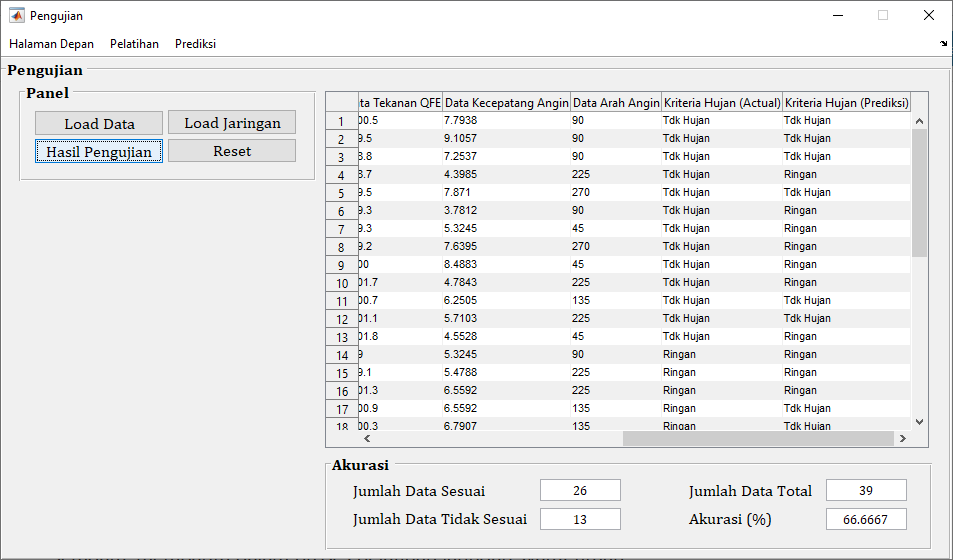
- Menguji model menggunakan data uji.
- Menghitung akurasi prediksi dan mengevaluasi performa model.
Source code untuk halaman pengujian:
function varargout = halaman_pengujian(varargin)
% HALAMAN_PENGUJIAN MATLAB code for halaman_pengujian.fig
%      HALAMAN_PENGUJIAN, by itself, creates a new HALAMAN_PENGUJIAN or raises the existing
%      singleton*.
%
%      H = HALAMAN_PENGUJIAN returns the handle to a new HALAMAN_PENGUJIAN or the handle to
%      the existing singleton*.
%
%      HALAMAN_PENGUJIAN('CALLBACK',hObject,eventData,handles,...) calls the local
%      function named CALLBACK in HALAMAN_PENGUJIAN.M with the given input arguments.
%
%      HALAMAN_PENGUJIAN('Property','Value',...) creates a new HALAMAN_PENGUJIAN or raises the
%      existing singleton*.  Starting from the left, property value pairs are
%      applied to the GUI before halaman_pengujian_OpeningFcn gets called.  An
%      unrecognized property name or invalid value makes property application
%      stop.  All inputs are passed to halaman_pengujian_OpeningFcn via varargin.
%
%      *See GUI Options on GUIDE's Tools menu.  Choose "GUI allows only one
%      instance to run (singleton)".
%
% See also: GUIDE, GUIDATA, GUIHANDLES

% Edit the above text to modify the response to help halaman_pengujian

% Last Modified by GUIDE v2.5 12-Feb-2021 12:48:44

% Begin initialization code - DO NOT EDIT
gui_Singleton = 1;
gui_State = struct('gui_Name',       mfilename, ...
    'gui_Singleton',  gui_Singleton, ...
    'gui_OpeningFcn', @halaman_pengujian_OpeningFcn, ...
    'gui_OutputFcn',  @halaman_pengujian_OutputFcn, ...
    'gui_LayoutFcn',  [] , ...
    'gui_Callback',   []);
if nargin && ischar(varargin{1})
    gui_State.gui_Callback = str2func(varargin{1});
end

if nargout
    [varargout{1:nargout}] = gui_mainfcn(gui_State, varargin{:});
else
    gui_mainfcn(gui_State, varargin{:});
end
% End initialization code - DO NOT EDIT


% --- Executes just before halaman_pengujian is made visible.
function halaman_pengujian_OpeningFcn(hObject, eventdata, handles, varargin)
% This function has no output args, see OutputFcn.
% hObject    handle to figure
% eventdata  reserved - to be defined in a future version of MATLAB
% handles    structure with handles and user data (see GUIDATA)
% varargin   command line arguments to halaman_pengujian (see VARARGIN)

% Choose default command line output for halaman_pengujian
handles.output = hObject;

% Update handles structure
guidata(hObject, handles);
movegui(hObject,'center');

% UIWAIT makes halaman_pengujian wait for user response (see UIRESUME)
% uiwait(handles.figure1);


% --- Outputs from this function are returned to the command line.
function varargout = halaman_pengujian_OutputFcn(hObject, eventdata, handles)
% varargout  cell array for returning output args (see VARARGOUT);
% hObject    handle to figure
% eventdata  reserved - to be defined in a future version of MATLAB
% handles    structure with handles and user data (see GUIDATA)

% Get default command line output from handles structure
varargout{1} = handles.output;


% --- Executes on button press in pushbutton4.


% --- Executes on button press in pushbutton1.
function pushbutton1_Callback(hObject, eventdata, handles)
% hObject    handle to pushbutton1 (see GCBO)
% eventdata  reserved - to be defined in a future version of MATLAB
% handles    structure with handles and user data (see GUIDATA)

% menampilkan menu browse file
[nama_file,nama_path] = uigetfile({'*.xlsx','Excel Data (*.xlsx)';
    '*.*','All file type (*.*)'},'Browse File');

% jika ada file yg dipilih maka akan menjalankan perintah di bawahnya
if ~isequal(nama_file,0)
    % mereset button2
    set(handles.edit1,'String','')
    set(handles.edit2,'String','')
    set(handles.edit3,'String','')
    set(handles.edit4,'String','')

    % membaca data pada file excel
    [~, ~, all_data] = xlsread(fullfile(nama_path,nama_file),2,'B2:J40');
    % menampilkan data pada tabel
    data_tabel = cell(39,9);
    for i = 1:size(data_tabel,1)
        for j = 1:size(data_tabel,2)-1
            data_tabel{i,j} = num2str(all_data{i,j});
        end
        data_tabel{i,9} = all_data{i,9};
    end

    % menampilkan data pada tabel
    set(handles.uitable1,'Data',data_tabel,'RowName',1:size(data_tabel,1))

    % menyimpan variabel all_data dan data_tabel pada lokasi handles
    % (lokasi penyimpanan variabel) agar dapat dipanggil oleh pushbutton
    % yg lain
    handles.all_data = all_data;
    handles.data_tabel = data_tabel;
    guidata(hObject,handles);

    % mereset button2
    set(handles.pushbutton2,'Enable','on')
    set(handles.pushbutton3,'Enable','off')
    set(handles.edit1,'String','')
    set(handles.edit2,'String','')
else
    % jika tidak ada file yg dipilih maka akan kembali
    return
end

% --- Executes on button press in pushbutton2.
function pushbutton2_Callback(hObject, eventdata, handles)
% hObject    handle to pushbutton2 (see GCBO)
% eventdata  reserved - to be defined in a future version of MATLAB
% handles    structure with handles and user data (see GUIDATA)

% menampilkan menu browse file
[nama_file,nama_path] = uigetfile({'*.mat','MAT File (*.mat)';
    '*.*','All file type (*.*)'},'Browse File');

% jika ada file yg dipilih maka akan menjalankan perintah di bawahnya
if ~isequal(nama_file,0)
    % mereset button2
    set(handles.edit1,'String','')
    set(handles.edit2,'String','')
    set(handles.edit3,'String','')
    set(handles.edit4,'String','')

    % menyimpan variabel nama_path2 dan nama_file2 pada lokasi handles agar
    % dapat dipanggil oleh pushbutton yg lain
    handles.nama_path = nama_path;
    handles.nama_file = nama_file;
    guidata(hObject,handles);
    % mereset button2
    set(handles.pushbutton3,'Enable','on')

    set(handles.edit1,'String','')
    set(handles.edit2,'String','')
else
    % jika tidak ada file yg dipilih maka akan kembali
    return
end


% --- Executes on button press in pushbutton3.
function pushbutton3_Callback(hObject, eventdata, handles)
% hObject    handle to pushbutton3 (see GCBO)
% eventdata  reserved - to be defined in a future version of MATLAB
% handles    structure with handles and user data (see GUIDATA)

% memanggil variabel2 yg ada di lokasi handles
nama_path = handles.nama_path;
nama_file = handles.nama_file;
data_tabel = handles.data_tabel;
all_data = handles.all_data;

% menyusun data latih asli
data_latih_asli = zeros(39,8);
for i = 1:size(data_latih_asli,1)
    for j = 1:size(data_latih_asli,2)
        data_latih_asli(i,j) = all_data{i,j};
    end
end

% mencari nilai min dan max pada data latih asli
min_data = min(data_latih_asli);
max_data = max(data_latih_asli);

% menyusun data uji asli
data_uji_asli = zeros(39,8);
for i = 1:size(data_uji_asli,1)
    for j = 1:size(data_uji_asli,2)
        data_uji_asli(i,j) = all_data{i,j};
    end
end

% proses normalisasi data
[m,n] = size(data_uji_asli);
data_uji_norm = zeros(m,n);
for x = 1:m
    for y = 1:n
        data_uji_norm(x,y) = 0.1+0.8*(data_uji_asli(x,y)-min_data(y))/(max_data(y)-min_data(y));
    end
end

% menyiapkan target latih asli
target_uji_asli = zeros(size(data_tabel,1),1);
for k = 1:size(data_tabel,1)
    switch data_tabel{k,9}
        case 'Tdk Hujan'
            target_uji_asli(k,1) = 0;
        case 'Ringan'
            target_uji_asli(k,1) = 1;
        case 'Sedang'
            target_uji_asli(k,1) = 2;
        otherwise
            target_uji_asli(k,1) = 3;
    end
end

% hasil pengujian
load(fullfile(nama_path,nama_file))

% hasil uji
hasil_uji_asli = sim(net_keluaran,data_uji_norm);

% menyusun kelas keluaran
kelas_keluaran = cell(size(data_tabel,1),1);
for k = 1:size(data_tabel,1)
    switch hasil_uji_asli(k,1)
        case 0
            kelas_keluaran{k,1} = 'Tdk Hujan';
        case 1
            kelas_keluaran{k,1} = 'Ringan';
        case 2
            kelas_keluaran{k,1} = 'Sedang';
        otherwise
            kelas_keluaran{k,1} = 'Anomali';
    end
end

% menghitung nilai akurasi
jumlah_data_sesuai = 0;
jumlah_data_tidak_sesuai = 0;
jumlah_data_total = size(data_tabel,1);
for k = 1:size(data_tabel,1)
    if isequal(data_tabel{k,9},kelas_keluaran{k,1})
        jumlah_data_sesuai = jumlah_data_sesuai+1;
    else
        jumlah_data_tidak_sesuai = jumlah_data_tidak_sesuai+1;
    end
end
akurasi = jumlah_data_sesuai/jumlah_data_total*100;

% menampilkan data pada tabel
data_tabel = [data_tabel,kelas_keluaran];
set(handles.uitable1,'Data',data_tabel,'RowName',1:size(data_tabel,1))

% menampilkan akurasi pada edit text
set(handles.edit1,'String',num2str(jumlah_data_sesuai))
set(handles.edit2,'String',num2str(jumlah_data_tidak_sesuai))
set(handles.edit3,'String',num2str(jumlah_data_total))
set(handles.edit4,'String',num2str(akurasi))


function pushbutton4_Callback(hObject, eventdata, handles)
% hObject    handle to pushbutton4 (see GCBO)
% eventdata  reserved - to be defined in a future version of MATLAB
% handles    structure with handles and user data (see GUIDATA)

% mereset button2
set(handles.pushbutton2,'Enable','off')
set(handles.pushbutton3,'Enable','off')

set(handles.uitable1,'Data',[],'RowName',{'' '' '' ''})

set(handles.edit1,'String','')
set(handles.edit2,'String','')
set(handles.edit3,'String','')
set(handles.edit4,'String','')


% --------------------------------------------------------------------
function Halaman_Depan_Callback(hObject, eventdata, handles)
% hObject    handle to Halaman_Depan (see GCBO)
% eventdata  reserved - to be defined in a future version of MATLAB
% handles    structure with handles and user data (see GUIDATA)

close all;
guidata(halaman_depan);

% --------------------------------------------------------------------
function Pelatihan_Callback(hObject, eventdata, handles)
% hObject    handle to Pelatihan (see GCBO)
% eventdata  reserved - to be defined in a future version of MATLAB
% handles    structure with handles and user data (see GUIDATA)

close all;
guidata(halaman_pelatihan);


% --------------------------------------------------------------------
function Prediksi_Callback(hObject, eventdata, handles)
% hObject    handle to Prediksi (see GCBO)
% eventdata  reserved - to be defined in a future version of MATLAB
% handles    structure with handles and user data (see GUIDATA)

close all;
guidata(halaman_prediksi);


function edit1_Callback(hObject, eventdata, handles)
% hObject    handle to edit1 (see GCBO)
% eventdata  reserved - to be defined in a future version of MATLAB
% handles    structure with handles and user data (see GUIDATA)

% Hints: get(hObject,'String') returns contents of edit1 as text
%        str2double(get(hObject,'String')) returns contents of edit1 as a double


% --- Executes during object creation, after setting all properties.
function edit1_CreateFcn(hObject, eventdata, handles)
% hObject    handle to edit1 (see GCBO)
% eventdata  reserved - to be defined in a future version of MATLAB
% handles    empty - handles not created until after all CreateFcns called

% Hint: edit controls usually have a white background on Windows.
%       See ISPC and COMPUTER.
if ispc && isequal(get(hObject,'BackgroundColor'), get(0,'defaultUicontrolBackgroundColor'))
    set(hObject,'BackgroundColor','white');
end


function edit2_Callback(hObject, eventdata, handles)
% hObject    handle to edit2 (see GCBO)
% eventdata  reserved - to be defined in a future version of MATLAB
% handles    structure with handles and user data (see GUIDATA)

% Hints: get(hObject,'String') returns contents of edit2 as text
%        str2double(get(hObject,'String')) returns contents of edit2 as a double


% --- Executes during object creation, after setting all properties.
function edit2_CreateFcn(hObject, eventdata, handles)
% hObject    handle to edit2 (see GCBO)
% eventdata  reserved - to be defined in a future version of MATLAB
% handles    empty - handles not created until after all CreateFcns called

% Hint: edit controls usually have a white background on Windows.
%       See ISPC and COMPUTER.
if ispc && isequal(get(hObject,'BackgroundColor'), get(0,'defaultUicontrolBackgroundColor'))
    set(hObject,'BackgroundColor','white');
end


function edit3_Callback(hObject, eventdata, handles)
% hObject    handle to edit3 (see GCBO)
% eventdata  reserved - to be defined in a future version of MATLAB
% handles    structure with handles and user data (see GUIDATA)

% Hints: get(hObject,'String') returns contents of edit3 as text
%        str2double(get(hObject,'String')) returns contents of edit3 as a double


% --- Executes during object creation, after setting all properties.
function edit3_CreateFcn(hObject, eventdata, handles)
% hObject    handle to edit3 (see GCBO)
% eventdata  reserved - to be defined in a future version of MATLAB
% handles    empty - handles not created until after all CreateFcns called

% Hint: edit controls usually have a white background on Windows.
%       See ISPC and COMPUTER.
if ispc && isequal(get(hObject,'BackgroundColor'), get(0,'defaultUicontrolBackgroundColor'))
    set(hObject,'BackgroundColor','white');
end


function edit4_Callback(hObject, eventdata, handles)
% hObject    handle to edit4 (see GCBO)
% eventdata  reserved - to be defined in a future version of MATLAB
% handles    structure with handles and user data (see GUIDATA)

% Hints: get(hObject,'String') returns contents of edit4 as text
%        str2double(get(hObject,'String')) returns contents of edit4 as a double


% --- Executes during object creation, after setting all properties.
function edit4_CreateFcn(hObject, eventdata, handles)
% hObject    handle to edit4 (see GCBO)
% eventdata  reserved - to be defined in a future version of MATLAB
% handles    empty - handles not created until after all CreateFcns called

% Hint: edit controls usually have a white background on Windows.
%       See ISPC and COMPUTER.
if ispc && isequal(get(hObject,'BackgroundColor'), get(0,'defaultUicontrolBackgroundColor'))
    set(hObject,'BackgroundColor','white');
end

Prediksi
- Melakukan prediksi kriteria hujan berdasarkan input variabel cuaca yang baru.
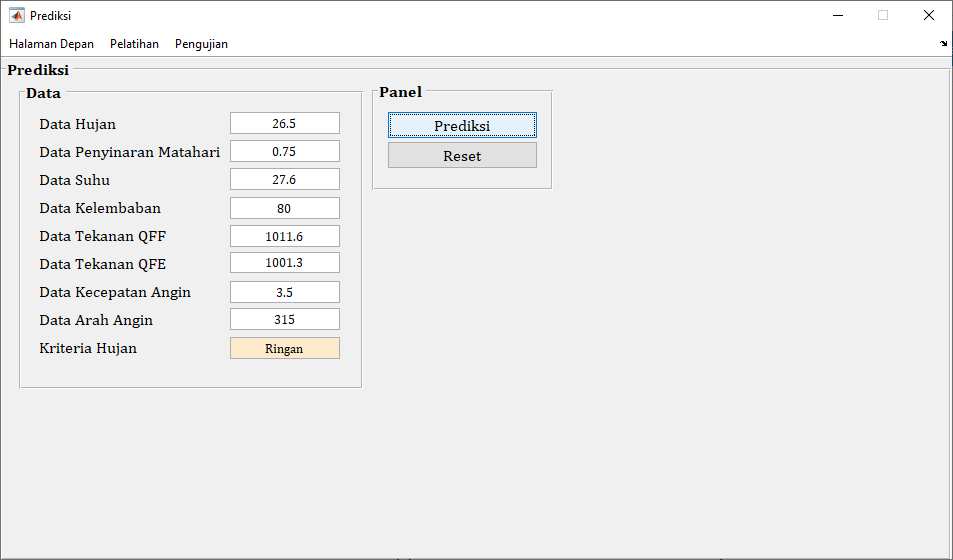
Source code untuk halaman prediksi:
function varargout = halaman_prediksi(varargin)
% HALAMAN_PREDIKSI MATLAB code for halaman_prediksi.fig
%      HALAMAN_PREDIKSI, by itself, creates a new HALAMAN_PREDIKSI or raises the existing
%      singleton*.
%
%      H = HALAMAN_PREDIKSI returns the handle to a new HALAMAN_PREDIKSI or the handle to
%      the existing singleton*.
%
%      HALAMAN_PREDIKSI('CALLBACK',hObject,eventData,handles,...) calls the local
%      function named CALLBACK in HALAMAN_PREDIKSI.M with the given input arguments.
%
%      HALAMAN_PREDIKSI('Property','Value',...) creates a new HALAMAN_PREDIKSI or raises the
%      existing singleton*.  Starting from the left, property value pairs are
%      applied to the GUI before halaman_prediksi_OpeningFcn gets called.  An
%      unrecognized property name or invalid value makes property application
%      stop.  All inputs are passed to halaman_prediksi_OpeningFcn via varargin.
%
%      *See GUI Options on GUIDE's Tools menu.  Choose "GUI allows only one
%      instance to run (singleton)".
%
% See also: GUIDE, GUIDATA, GUIHANDLES

% Edit the above text to modify the response to help halaman_prediksi

% Last Modified by GUIDE v2.5 13-Apr-2021 04:57:03

% Begin initialization code - DO NOT EDIT
gui_Singleton = 1;
gui_State = struct('gui_Name',       mfilename, ...
    'gui_Singleton',  gui_Singleton, ...
    'gui_OpeningFcn', @halaman_prediksi_OpeningFcn, ...
    'gui_OutputFcn',  @halaman_prediksi_OutputFcn, ...
    'gui_LayoutFcn',  [] , ...
    'gui_Callback',   []);
if nargin && ischar(varargin{1})
    gui_State.gui_Callback = str2func(varargin{1});
end

if nargout
    [varargout{1:nargout}] = gui_mainfcn(gui_State, varargin{:});
else
    gui_mainfcn(gui_State, varargin{:});
end
% End initialization code - DO NOT EDIT


% --- Executes just before halaman_prediksi is made visible.
function halaman_prediksi_OpeningFcn(hObject, eventdata, handles, varargin)
% This function has no output args, see OutputFcn.
% hObject    handle to figure
% eventdata  reserved - to be defined in a future version of MATLAB
% handles    structure with handles and user data (see GUIDATA)
% varargin   command line arguments to halaman_prediksi (see VARARGIN)

% Choose default command line output for halaman_prediksi
handles.output = hObject;

% Update handles structure
guidata(hObject, handles);
movegui(hObject,'center');

% UIWAIT makes halaman_prediksi wait for user response (see UIRESUME)
% uiwait(handles.figure1);


% --- Outputs from this function are returned to the command line.
function varargout = halaman_prediksi_OutputFcn(hObject, eventdata, handles)
% varargout  cell array for returning output args (see VARARGOUT);
% hObject    handle to figure
% eventdata  reserved - to be defined in a future version of MATLAB
% handles    structure with handles and user data (see GUIDATA)

% Get default command line output from handles structure
varargout{1} = handles.output;


% --- Executes on button press in pushbutton2.
function pushbutton2_Callback(hObject, eventdata, handles)
% hObject    handle to pushbutton2 (see GCBO)
% eventdata  reserved - to be defined in a future version of MATLAB
% handles    structure with handles and user data (see GUIDATA)

% menampilkan menu browse file
[nama_file,nama_path] = uigetfile({'*.mat','MAT File (*.mat)';
    '*.*','All file type (*.*)'},'Browse File');

% jika ada file yg dipilih maka akan menjalankan perintah di bawahnya
if ~isequal(nama_file,0)
    % menyimpan variabel nama_path2 dan nama_file2 pada lokasi handles agar
    % dapat dipanggil oleh pushbutton yg lain
    handles.nama_path = nama_path;
    handles.nama_file = nama_file;
    guidata(hObject,handles);
    % mereset button2
    set(handles.pushbutton3,'Enable','on')

else
    % jika tidak ada file yg dipilih maka akan kembali
    return
end


% --------------------------------------------------------------------
function Halaman_Depan_Callback(hObject, eventdata, handles)
% hObject    handle to Halaman_Depan (see GCBO)
% eventdata  reserved - to be defined in a future version of MATLAB
% handles    structure with handles and user data (see GUIDATA)

close all;
guidata(halaman_depan);


% --------------------------------------------------------------------
function Pelatihan_Callback(hObject, eventdata, handles)
% hObject    handle to Pelatihan (see GCBO)
% eventdata  reserved - to be defined in a future version of MATLAB
% handles    structure with handles and user data (see GUIDATA)

close all;
guidata(halaman_pelatihan);


% --------------------------------------------------------------------
function Pengujian_Callback(hObject, eventdata, handles)
% hObject    handle to Pengujian (see GCBO)
% eventdata  reserved - to be defined in a future version of MATLAB
% handles    structure with handles and user data (see GUIDATA)

close all;
guidata(halaman_pengujian);


% --- Executes on button press in pushbutton3.
function pushbutton3_Callback(hObject, eventdata, handles)
% hObject    handle to pushbutton3 (see GCBO)
% eventdata  reserved - to be defined in a future version of MATLAB
% handles    structure with handles and user data (see GUIDATA)

load jaringan_100_traingdx_sigmoid_biner.mat

% proses normalisasi data
x1 = str2double(get(handles.edit1,'String'));
x2 = str2double(get(handles.edit2,'String'));
x3 = str2double(get(handles.edit3,'String'));
x4 = str2double(get(handles.edit4,'String'));
x5 = str2double(get(handles.edit5,'String'));
x6 = str2double(get(handles.edit6,'String'));
x7 = str2double(get(handles.edit7,'String'));
x8 = str2double(get(handles.edit8,'String'));
data_uji_asli = [x1,x2/100,x3,x4,x5,x6,x7,x8];

[m,n] = size(data_uji_asli);
data_uji_norm = zeros(m,n);
for x = 1:m
    for y = 1:n
        data_uji_norm(x,y) = 0.1+0.8*(data_uji_asli(x,y)-min_data(y))/(max_data(y)-min_data(y));
    end
end

% hasil pengujian
hasil_uji_asli = sim(net_keluaran,data_uji_norm);

% menyusun kelas keluaran
kelas_keluaran = cell(2,1);
switch hasil_uji_asli(1)
    case 0
        kelas_keluaran{1} = 'Tdk Hujan';
    case 1
        kelas_keluaran{1} = 'Ringan';
    case 2
        kelas_keluaran{1} = 'Sedang';
    otherwise
        kelas_keluaran{1} = 'Anomali';
end

% menampilkan kelas keluaran pada edit text
set(handles.edit9,'String',kelas_keluaran{1})

% --- Executes on button press in pushbutton4.
function pushbutton4_Callback(hObject, eventdata, handles)
% hObject    handle to pushbutton4 (see GCBO)
% eventdata  reserved - to be defined in a future version of MATLAB
% handles    structure with handles and user data (see GUIDATA)

% mereset button2
set(handles.edit1,'String',[])
set(handles.edit2,'String',[])
set(handles.edit3,'String',[])
set(handles.edit4,'String',[])
set(handles.edit5,'String',[])
set(handles.edit6,'String',[])
set(handles.edit7,'String',[])
set(handles.edit8,'String',[])
set(handles.edit9,'String',[])

set(handles.pushbutton3,'Enable','off')


function edit1_Callback(hObject, eventdata, handles)
% hObject    handle to edit1 (see GCBO)
% eventdata  reserved - to be defined in a future version of MATLAB
% handles    structure with handles and user data (see GUIDATA)

% Hints: get(hObject,'String') returns contents of edit1 as text
%        str2double(get(hObject,'String')) returns contents of edit1 as a double


% --- Executes during object creation, after setting all properties.
function edit1_CreateFcn(hObject, eventdata, handles)
% hObject    handle to edit1 (see GCBO)
% eventdata  reserved - to be defined in a future version of MATLAB
% handles    empty - handles not created until after all CreateFcns called

% Hint: edit controls usually have a white background on Windows.
%       See ISPC and COMPUTER.
if ispc && isequal(get(hObject,'BackgroundColor'), get(0,'defaultUicontrolBackgroundColor'))
    set(hObject,'BackgroundColor','white');
end


function edit2_Callback(hObject, eventdata, handles)
% hObject    handle to edit2 (see GCBO)
% eventdata  reserved - to be defined in a future version of MATLAB
% handles    structure with handles and user data (see GUIDATA)

% Hints: get(hObject,'String') returns contents of edit2 as text
%        str2double(get(hObject,'String')) returns contents of edit2 as a double


% --- Executes during object creation, after setting all properties.
function edit2_CreateFcn(hObject, eventdata, handles)
% hObject    handle to edit2 (see GCBO)
% eventdata  reserved - to be defined in a future version of MATLAB
% handles    empty - handles not created until after all CreateFcns called

% Hint: edit controls usually have a white background on Windows.
%       See ISPC and COMPUTER.
if ispc && isequal(get(hObject,'BackgroundColor'), get(0,'defaultUicontrolBackgroundColor'))
    set(hObject,'BackgroundColor','white');
end


function edit3_Callback(hObject, eventdata, handles)
% hObject    handle to edit3 (see GCBO)
% eventdata  reserved - to be defined in a future version of MATLAB
% handles    structure with handles and user data (see GUIDATA)

% Hints: get(hObject,'String') returns contents of edit3 as text
%        str2double(get(hObject,'String')) returns contents of edit3 as a double


% --- Executes during object creation, after setting all properties.
function edit3_CreateFcn(hObject, eventdata, handles)
% hObject    handle to edit3 (see GCBO)
% eventdata  reserved - to be defined in a future version of MATLAB
% handles    empty - handles not created until after all CreateFcns called

% Hint: edit controls usually have a white background on Windows.
%       See ISPC and COMPUTER.
if ispc && isequal(get(hObject,'BackgroundColor'), get(0,'defaultUicontrolBackgroundColor'))
    set(hObject,'BackgroundColor','white');
end


function edit4_Callback(hObject, eventdata, handles)
% hObject    handle to edit4 (see GCBO)
% eventdata  reserved - to be defined in a future version of MATLAB
% handles    structure with handles and user data (see GUIDATA)

% Hints: get(hObject,'String') returns contents of edit4 as text
%        str2double(get(hObject,'String')) returns contents of edit4 as a double


% --- Executes during object creation, after setting all properties.
function edit4_CreateFcn(hObject, eventdata, handles)
% hObject    handle to edit4 (see GCBO)
% eventdata  reserved - to be defined in a future version of MATLAB
% handles    empty - handles not created until after all CreateFcns called

% Hint: edit controls usually have a white background on Windows.
%       See ISPC and COMPUTER.
if ispc && isequal(get(hObject,'BackgroundColor'), get(0,'defaultUicontrolBackgroundColor'))
    set(hObject,'BackgroundColor','white');
end


function edit5_Callback(hObject, eventdata, handles)
% hObject    handle to edit5 (see GCBO)
% eventdata  reserved - to be defined in a future version of MATLAB
% handles    structure with handles and user data (see GUIDATA)

% Hints: get(hObject,'String') returns contents of edit5 as text
%        str2double(get(hObject,'String')) returns contents of edit5 as a double


% --- Executes during object creation, after setting all properties.
function edit5_CreateFcn(hObject, eventdata, handles)
% hObject    handle to edit5 (see GCBO)
% eventdata  reserved - to be defined in a future version of MATLAB
% handles    empty - handles not created until after all CreateFcns called

% Hint: edit controls usually have a white background on Windows.
%       See ISPC and COMPUTER.
if ispc && isequal(get(hObject,'BackgroundColor'), get(0,'defaultUicontrolBackgroundColor'))
    set(hObject,'BackgroundColor','white');
end


function edit6_Callback(hObject, eventdata, handles)
% hObject    handle to edit6 (see GCBO)
% eventdata  reserved - to be defined in a future version of MATLAB
% handles    structure with handles and user data (see GUIDATA)

% Hints: get(hObject,'String') returns contents of edit6 as text
%        str2double(get(hObject,'String')) returns contents of edit6 as a double


% --- Executes during object creation, after setting all properties.
function edit6_CreateFcn(hObject, eventdata, handles)
% hObject    handle to edit6 (see GCBO)
% eventdata  reserved - to be defined in a future version of MATLAB
% handles    empty - handles not created until after all CreateFcns called

% Hint: edit controls usually have a white background on Windows.
%       See ISPC and COMPUTER.
if ispc && isequal(get(hObject,'BackgroundColor'), get(0,'defaultUicontrolBackgroundColor'))
    set(hObject,'BackgroundColor','white');
end


function edit7_Callback(hObject, eventdata, handles)
% hObject    handle to edit7 (see GCBO)
% eventdata  reserved - to be defined in a future version of MATLAB
% handles    structure with handles and user data (see GUIDATA)

% Hints: get(hObject,'String') returns contents of edit7 as text
%        str2double(get(hObject,'String')) returns contents of edit7 as a double


% --- Executes during object creation, after setting all properties.
function edit7_CreateFcn(hObject, eventdata, handles)
% hObject    handle to edit7 (see GCBO)
% eventdata  reserved - to be defined in a future version of MATLAB
% handles    empty - handles not created until after all CreateFcns called

% Hint: edit controls usually have a white background on Windows.
%       See ISPC and COMPUTER.
if ispc && isequal(get(hObject,'BackgroundColor'), get(0,'defaultUicontrolBackgroundColor'))
    set(hObject,'BackgroundColor','white');
end


function edit8_Callback(hObject, eventdata, handles)
% hObject    handle to edit8 (see GCBO)
% eventdata  reserved - to be defined in a future version of MATLAB
% handles    structure with handles and user data (see GUIDATA)

% Hints: get(hObject,'String') returns contents of edit8 as text
%        str2double(get(hObject,'String')) returns contents of edit8 as a double


% --- Executes during object creation, after setting all properties.
function edit8_CreateFcn(hObject, eventdata, handles)
% hObject    handle to edit8 (see GCBO)
% eventdata  reserved - to be defined in a future version of MATLAB
% handles    empty - handles not created until after all CreateFcns called

% Hint: edit controls usually have a white background on Windows.
%       See ISPC and COMPUTER.
if ispc && isequal(get(hObject,'BackgroundColor'), get(0,'defaultUicontrolBackgroundColor'))
    set(hObject,'BackgroundColor','white');
end


function edit9_Callback(hObject, eventdata, handles)
% hObject    handle to edit9 (see GCBO)
% eventdata  reserved - to be defined in a future version of MATLAB
% handles    structure with handles and user data (see GUIDATA)

% Hints: get(hObject,'String') returns contents of edit9 as text
%        str2double(get(hObject,'String')) returns contents of edit9 as a double


% --- Executes during object creation, after setting all properties.
function edit9_CreateFcn(hObject, eventdata, handles)
% hObject    handle to edit9 (see GCBO)
% eventdata  reserved - to be defined in a future version of MATLAB
% handles    empty - handles not created until after all CreateFcns called

% Hint: edit controls usually have a white background on Windows.
%       See ISPC and COMPUTER.
if ispc && isequal(get(hObject,'BackgroundColor'), get(0,'defaultUicontrolBackgroundColor'))
    set(hObject,'BackgroundColor','white');
end


function edit10_Callback(hObject, eventdata, handles)
% hObject    handle to edit10 (see GCBO)
% eventdata  reserved - to be defined in a future version of MATLAB
% handles    structure with handles and user data (see GUIDATA)

% Hints: get(hObject,'String') returns contents of edit10 as text
%        str2double(get(hObject,'String')) returns contents of edit10 as a double


% --- Executes during object creation, after setting all properties.
function edit10_CreateFcn(hObject, eventdata, handles)
% hObject    handle to edit10 (see GCBO)
% eventdata  reserved - to be defined in a future version of MATLAB
% handles    empty - handles not created until after all CreateFcns called

% Hint: edit controls usually have a white background on Windows.
%       See ISPC and COMPUTER.
if ispc && isequal(get(hObject,'BackgroundColor'), get(0,'defaultUicontrolBackgroundColor'))
    set(hObject,'BackgroundColor','white');
end
- Normalisasi Data: Data dinormalisasi untuk memastikan setiap variabel memiliki rentang nilai yang seragam, membantu dalam proses pelatihan jaringan syaraf tiruan.
- Membagi Data: Data dibagi menjadi data latih dan data uji. Data latih digunakan untuk melatih model, sementara data uji digunakan untuk menguji akurasi model.
- Membuat Model JST: Jaringan syaraf tiruan dibuat dengan 100 neuron pada hidden layer dan menggunakan algoritma backpropagation Levenberg-Marquardt untuk pelatihan.
- Pelatihan dan Prediksi: JST dilatih menggunakan data latih dan kemudian digunakan untuk memprediksi kriteria hujan pada data uji.
- Evaluasi Akurasi: Akurasi model dihitung berdasarkan persentase prediksi yang benar.
Dengan menggunakan MATLAB dan JST Backpropagation, kita dapat memprediksi kriteria hujan berdasarkan variabel-variabel cuaca historis. Metode ini menunjukkan potensi dalam meningkatkan akurasi prediksi cuaca, yang dapat berguna untuk berbagai aplikasi praktis seperti pertanian, manajemen air, dan mitigasi bencana.
Posted on June 12, 2024, in Data mining and tagged Cuaca Meteorologi, Data Cuaca, Evaluasi Model, jaringan syaraf tiruan, JST Backpropagation, machine learning, Normalisasi Data, pemrograman matlab, Prediksi Cuaca, Prediksi Hujan. Bookmark the permalink. Leave a comment.











 Pemrograman Matlab
Leave a comment
Comments 0